Teams are subsets of a Group. Team Captains act as managers of their respective teams. However, it is not required to have a Team Captain. Teams can be used in a number of ways.
- Teams can be used to promote competition between various teams of people. Some organizations have even held contests with prizes for the winners!
- A Team Captain has the ability to review and manage the goals, business plan, etc. of the members of his team. This is useful when the template manager wants to give managerial access to a specific subset of users to another individual.
- Teams do not have to be visible to one another. This is useful for coaches that are working with disparate teams. This way all of the information is in one location for the coach or manager while it is not visible to the individual teams.
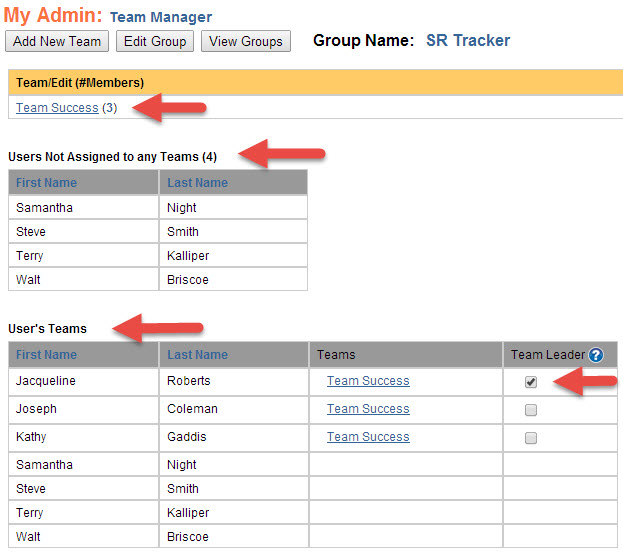
The Team Manager screen contains some helpful information.
- To get to the Team Manager screen:
- Log into KDNA at www.kdna.kdna.com.
- Select Admin - Add / Edit Groups.
- Select the View Teams link in the second column of the row containing the Tracker and Group to which you want to add a Team.
- On this screen you will see:
- The names of the teams that have already been created. If you hover over a team name, the names of the team members will be displayed.
- A list a users that are not yet assigned to a team.
- A list of all users and what team(s) they are on.
- This last list also indicates which users are Team Captains.