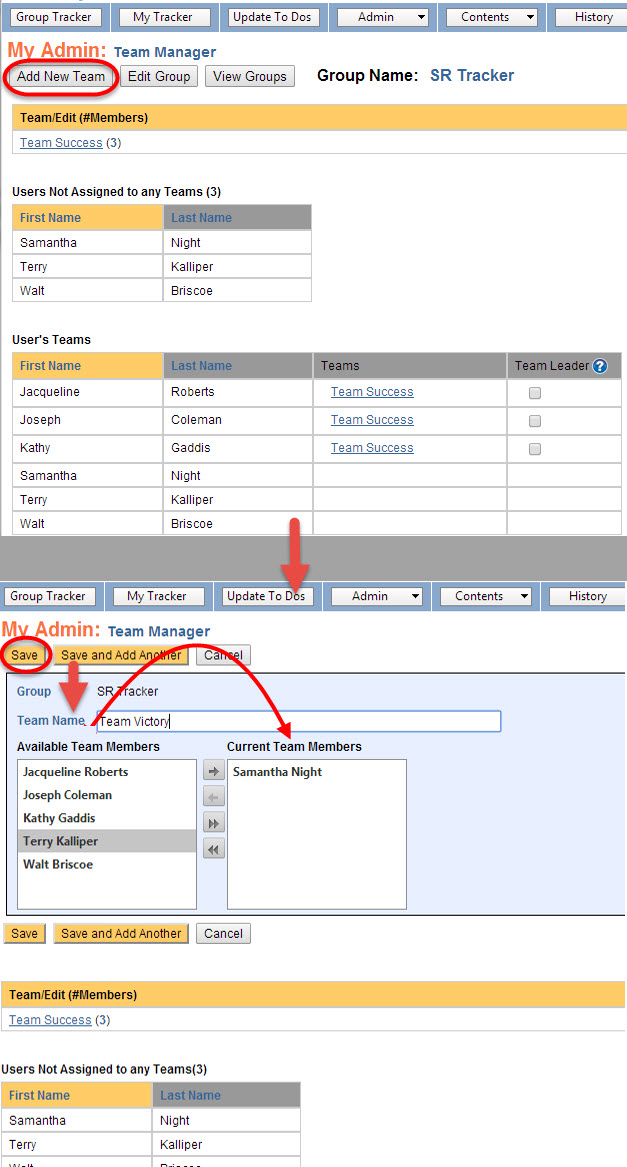
You can add a user to one or more teams. To create a new team, follow the steps below:
- Log into KDNA at www.kdna.kdna.com.
- Select Admin - Add / Edit Groups.
- Select the View Teams link in the second column of the row containing the Tracker and Group to which you want to add a Team.
- Select the Add New Teams button at the top left of the Team Manager screen. (Top portion of image)
- Type your Team Name in the Team Name text box. (Bottom portion of image)
- Drag users that belong in this new team from the Available Team Members box to the Current Team Members box.
- Repeat the above step for all the team members.
- When you are finished, select the Save button.